Dimension Group Properties
Overview
Dimension group properties define how a dimension group is structured, displayed, and used within your project. They provide the key settings that control everything from how measurements are categorized and calculated to how they appear visually on drawings.
When configuring a dimension group, you will set essential details such as its name, assign it to a folder, and define the appropriate measurement and display types. You can customize visual elements like positive and negative colors, along with default values such as height and offset to ensure consistency in measurement placement. Additional notes can be included to provide context or guidance for users.
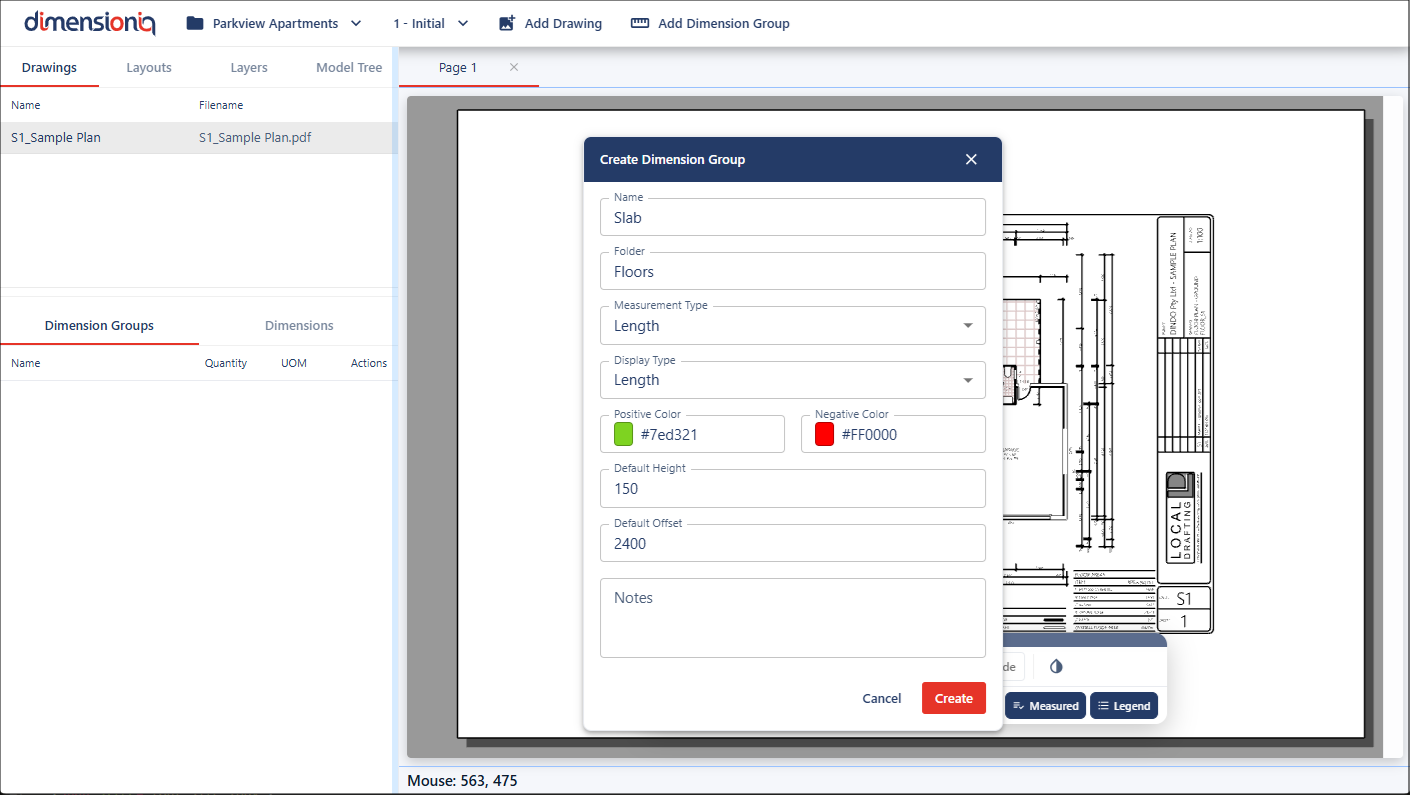
Dimension Group Name
This is the identifier for the dimension group and should be clear and descriptive. It helps understand the purpose of the group and distinguishes it from other groups.
Dimension Group Folder Assignment
Every dimension group must be assigned to a folder to ensure measurements are organized logically within the project. You can create a new folder or select an existing folder.
Measurement Type and Display Type
The Measurement Type and Display Type fields control how the dimension group calculates and presents data.
- Measurement type defines how the quantity is calculated, for example, Count, Length, Area, Volume, or Weight
- Display type determines which value is shown in the user interface
Both values are visible in the head-up display when hovering over the dimension on the drawing. However, in the left-hand menu, only the display type value is shown. By default, both fields are set to Length.
Positive and Negative Colors
The Positive Color and Negative Color fields define how the measurements are visually represented on drawings during takeoff.
- Positive color is the color used to display measurements that add to the quantity, such as wall lengths or areas being included in the calculation
- Negative color is the color used to show measurements that subtract from the total, such as openings, cut-outs, or areas to exclude
Clicking in each of the color fields will open the color picker to select a color or add a custom color.
Default Height and Offset
The default height and default offset are used to represent the vertical position of measurements within a building, such as which storey a wall, length, or area belongs to.
Default height defines the vertical elevation of the measurement. For example, if a length dimension is rendered with a height of 2400mm, it can visually represent a wall with a height of 2.4m in the 3D view.
Default offset raises the dimension by an additional vertical amount. This allows measurements to be positioned above the base height, making it possible to represent elements on different storeys or levels of a building.
Together, these values allow dimensions to be visualized at different elevations, enabling scenarios such as walls or areas on multiple storeys with the same drawing.
When a dimension group is created, the default height and offset provide the initial values used by its dimensions. These values can be adjusted later, allowing measurements to be taken or displayed at different building levels as required.